
Model HQ
DocumentationAgent Services
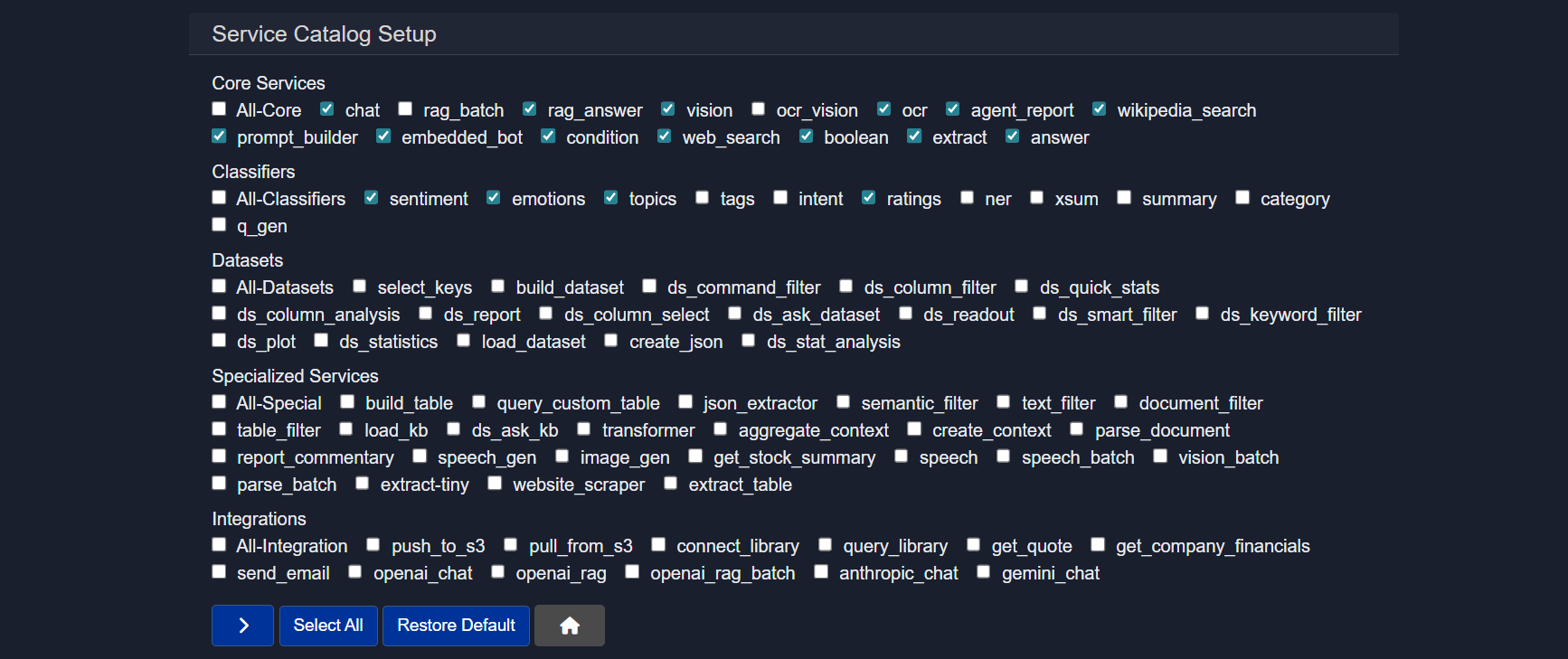
Services are the functional units that power every step of an agent workflow. Each service represents a distinct capability — from answering questions and extracting data, to querying databases, running classifiers, calling external APIs, and generating reports.
Only services that have been added and enabled in the Services section of an agent are available for selection inside nodes. This keeps agents modular and predictable: you can see exactly what each agent is capable of at a glance, and adding or removing a service directly controls what nodes can do.
Services are organized into five categories based on their purpose. The table in each section serves as a quick reference — the descriptions beneath provide the context you need to use each one effectively.

2 On-Device Agent Demos on Snapdragon X Elite (RAG + Vision) | Model HQ + Microsoft Foundry Models

No-Code Sentiment & Emotion Detection Agent in Model HQ (On-Device + Private AI)

Private, Local Image Agents in Model HQ: Describe Images + Extract Numbers (Fast!)

Handwriting-Reading Agent with On-Device AI | Prescription Reading Agent (no code, private)

Contract Analyzer Agent in Minutes (No-Code + Offline) | Model HQ Demo
1. Core services
General building blocks for common tasks such as chat, retrieval, extraction, and logic control.
| Service Name | Instruction | Description | Context |
|---|---|---|---|
| chat | What is your question or instruction? | Answers a question or performs instruction | MAIN-INPUT, User-Text, None |
| rag_batch | Enter question or instruction | Performs RAG over batch of documents | User-collection |
| rag_answer | Ask question to longer document input | Answers a question based on a longer document input | User-Source, Provide_instruction_or_query |
| vision | Enter question to image file | Provides answer/description from image | User-Image |
| ocr_vision | Enter instruction | Performs OCR + vision-based understanding | User-Document, User-Image |
| ocr | Enter name of new document source | Extracts content from image-based or protected documents | User-Document |
| agent_report | Enter title for agent report | Prepares report on agent output | - |
| wikipedia_search | Add Wikipedia Articles as Research Context | Adds Wikipedia articles as research context | None |
| prompt_builder | Enter prompt instruction | Builds structured prompts | None |
| embedded_bot | Optional | Pauses execution for user interaction | None |
| condition | Enter expression | Evaluates logical condition | None |
| web_search | Add query | Performs web search and returns structured results | None |
| boolean | Provide yes/no question | Provides yes/no answer with explanation | MAIN-INPUT, User-Text |
| extract | Enter extraction key | Extracts key-value pair | MAIN-INPUT, User-Text |
| answer | What is your question? | Answers specific question from passage | MAIN-INPUT, User-Text |
Service Name
chat
Instruction
What is your question or instruction?
Description
Answers a question or performs instruction
Context
MAIN-INPUT, User-Text, None
Service Name
rag_batch
Instruction
Enter question or instruction
Description
Performs RAG over batch of documents
Context
User-collection
Service Name
rag_answer
Instruction
Ask question to longer document input
Description
Answers a question based on a longer document input
Context
User-Source, Provide_instruction_or_query
Service Name
vision
Instruction
Enter question to image file
Description
Provides answer/description from image
Context
User-Image
Service Name
ocr_vision
Instruction
Enter instruction
Description
Performs OCR + vision-based understanding
Context
User-Document, User-Image
Service Name
ocr
Instruction
Enter name of new document source
Description
Extracts content from image-based or protected documents
Context
User-Document
Service Name
agent_report
Instruction
Enter title for agent report
Description
Prepares report on agent output
Context
-
Service Name
wikipedia_search
Instruction
Add Wikipedia Articles as Research Context
Description
Adds Wikipedia articles as research context
Context
None
Service Name
prompt_builder
Instruction
Enter prompt instruction
Description
Builds structured prompts
Context
None
Service Name
embedded_bot
Instruction
Optional
Description
Pauses execution for user interaction
Context
None
Service Name
condition
Instruction
Enter expression
Description
Evaluates logical condition
Context
None
Service Name
web_search
Instruction
Add query
Description
Performs web search and returns structured results
Context
None
Service Name
boolean
Instruction
Provide yes/no question
Description
Provides yes/no answer with explanation
Context
MAIN-INPUT, User-Text
Service Name
extract
Instruction
Enter extraction key
Description
Extracts key-value pair
Context
MAIN-INPUT, User-Text
Service Name
answer
Instruction
What is your question?
Description
Answers specific question from passage
Context
MAIN-INPUT, User-Text
1.1 chat
The general-purpose model interaction node. Accepts a question or instruction and generates a response from the active language model. Works off MAIN-INPUT, User-Text, or no context at all — making it suitable for drafting, summarizing, reformatting, or any open-ended task at any point in the pipeline.
Instruction: What is your question or instruction?
Context: MAIN-INPUT, User-Text, None
1.2 rag_batch
Answers a question across a collection of documents rather than a single file. It searches the entire User-Collection batch, retrieves the most relevant passages from each, and constructs a grounded response. Best suited for research pipelines and multi-file document review workflows.
Instruction: Enter question or instruction
Context: User-Document
1.3 rag_answer
Designed for long single-document inputs where the source exceeds standard prompt limits. rag_answer chunks the document internally, retrieves the most relevant sections, and returns an answer grounded in the actual text — not the model's general knowledge.
Instruction: Ask question to longer document input
Context: User-Source, Provide_instruction_or_query
1.4 vision
Adds visual reasoning to the workflow. Supply an image, ask a question, and the service responds based on what the multimodal model sees — reading embedded text, identifying objects, describing scenes, or interpreting diagrams.
Instruction: Enter question to image file
Context: User-Image
1.5 ocr_vision
For documents and images where both text extraction and visual context matter. Applies OCR to extract the text first, then uses vision-based reasoning to interpret it in context — suited for scanned forms, annotated diagrams, and mixed-content PDFs.
Instruction: Enter instruction
Context: User-Document, User-Image
1.6 ocr
Extracts text from image-based or copy-protected documents and registers the result as a named source in the agent state. The extracted content then becomes available to any downstream node — for RAG, extraction, or summarization — just like any regular document.
Instruction: Enter name of new document source
Context: User-Document
1.7 agent_report
Reads the accumulated agent state and compiles everything into a structured, titled report. Typically placed at the end of a workflow. No specific input context is required — it assembles from whatever the pipeline has produced up to that point.
Instruction: Enter title for agent report
Context: -
1.8 wikipedia_search
Fetches Wikipedia article content and injects it into the agent state as research context. No pre-loaded documents are needed, making it a lightweight way to add factual grounding to any workflow without managing external sources.
Instruction: Add Wikipedia Articles as Research Context
Context: None
1.9 prompt_builder
Constructs a structured prompt dynamically from the current agent state rather than relying on a hardcoded string. Best placed immediately before a model-execution node to ensure the prompt is well-formed and adapts to the pipeline's state at runtime.
Instruction: Enter prompt instruction
Context: None
1.10 embedded_bot
Pauses workflow execution and surfaces an interactive interface for a human operator. Execution resumes once the operator provides input or confirms a decision. The instruction field is optional. This is the primary mechanism for human-in-the-loop pipelines.
Instruction: Optional
Context: None
1.11 condition
Evaluates a logical expression against the current agent state and routes execution accordingly. Acts as an if/else branch point in the pipeline — no external context required. The expression can reference any key present in the agent state.
Instruction: Enter expression
Context: None
1.12 web_search
Queries the web at runtime and returns structured results — titles, snippets, and source URLs — for downstream nodes to act on. Useful when the workflow requires up-to-date or real-time information that is not available in any pre-loaded source.
Instruction: Add query
Context: None
1.13 boolean
Takes a yes/no question, evaluates it against the input text, and returns a binary answer along with a brief explanation. Best placed at screening or validation steps where a clear true/false signal is needed before the workflow proceeds.
Instruction: Provide yes/no question
Context: MAIN-INPUT, User-Text
1.14 extract
Pulls a specific named value from unstructured text. Specify the key as the instruction, and the service returns the corresponding value from the input. Use it to surface discrete fields — dates, names, amounts, identifiers — and carry them forward in the agent state.
Instruction: Enter extraction key
Context: MAIN-INPUT, User-Text
1.15 answer
A context-constrained alternative to chat. Responds to a factual question using only the supplied input text — never the model's broader training knowledge. Use it wherever responses must be directly traceable to the provided passage.
Instruction: What is your question?
Context: MAIN-INPUT, User-Text
2. Classifiers
Lightweight text analysis tools for labeling or scoring content.
| Service Name | Instruction | Description | Context |
|---|---|---|---|
| sentiment | No instruction required | Analyzes sentiment | MAIN-INPUT, User-Text |
| emotions | No instruction required | Analyzes emotion | MAIN-INPUT, User-Text |
| topics | No instruction required | Classifies topic | MAIN-INPUT, User-Text |
| tags | No instruction required | Generates tags | MAIN-INPUT, User-Text |
| intent | No instruction required | Classifies intent | MAIN-INPUT, User-Text |
| ratings | No instruction required | Rates positivity (1–5) | MAIN-INPUT, User-Text |
| ner | No instruction required | Named entity recognition | MAIN-INPUT, User-Text |
| xsum | No instruction required | Generates extreme summary | MAIN-INPUT, User-Text |
| summary | Optional | Summarizes content | MAIN-INPUT, User-Text |
| category | No instruction required | Classifies category | MAIN-INPUT, User-Text |
| q_gen | No instruction required | Generates questions | MAIN-INPUT, User-Text |
Service Name
sentiment
Instruction
No instruction required
Description
Analyzes sentiment
Context
MAIN-INPUT, User-Text
Service Name
emotions
Instruction
No instruction required
Description
Analyzes emotion
Context
MAIN-INPUT, User-Text
Service Name
topics
Instruction
No instruction required
Description
Classifies topic
Context
MAIN-INPUT, User-Text
Service Name
tags
Instruction
No instruction required
Description
Generates tags
Context
MAIN-INPUT, User-Text
Service Name
intent
Instruction
No instruction required
Description
Classifies intent
Context
MAIN-INPUT, User-Text
Service Name
ratings
Instruction
No instruction required
Description
Rates positivity (1–5)
Context
MAIN-INPUT, User-Text
Service Name
ner
Instruction
No instruction required
Description
Named entity recognition
Context
MAIN-INPUT, User-Text
Service Name
xsum
Instruction
No instruction required
Description
Generates extreme summary
Context
MAIN-INPUT, User-Text
Service Name
summary
Instruction
Optional
Description
Summarizes content
Context
MAIN-INPUT, User-Text
Service Name
category
Instruction
No instruction required
Description
Classifies category
Context
MAIN-INPUT, User-Text
Service Name
q_gen
Instruction
No instruction required
Description
Generates questions
Context
MAIN-INPUT, User-Text
2.1 sentiment
Runs sentiment analysis on the input text and returns a positive, negative, or neutral classification. No instruction is needed — the service operates directly on MAIN-INPUT or User-Text. Useful for customer feedback pipelines, review analysis, and any workflow where emotional tone needs to be assessed at scale.
Instruction: No instruction required
Context: MAIN-INPUT, User-Text, Transformer Node (with selection of a previous output from an earlier agent step from a chat or vision bot, or dataset column that contains relevant text)
2.2 emotions
Goes a level deeper than sentiment by identifying the specific emotion present in the text — such as joy, frustration, surprise, or fear. Like all classifiers, it requires no instruction and runs directly on MAIN-INPUT or User-Text.
Instruction: No instruction required
Context: MAIN-INPUT, User-Text, Transformer Node (with selection of a previous output from an earlier agent step from a chat or vision bot, or dataset column that contains relevant text)
2.3 topics
Identifies the primary topic or subject area of the input text. No instruction is required. Useful for categorizing incoming content, routing documents to the right downstream nodes, or tagging records in bulk processing workflows.
Instruction: No instruction required
Context: MAIN-INPUT, User-Text, Transformer Node (with selection of a previous output from an earlier agent step from a chat or vision bot, or dataset column that contains relevant text)
2.4 tags
Generates a set of descriptive tags from the input text. No instruction is required. Tags can be used to index content, enable filtering in later nodes, or surface key themes across a batch of documents.
Instruction: No instruction required
Context: MAIN-INPUT, User-Text, Transformer Node (with selection of a previous output from an earlier agent step from a chat or vision bot, or dataset column that contains relevant text)
2.5 intent
Classifies the intent behind the input text — for example, whether the user is making a request, asking a question, expressing a complaint, or providing information. No instruction is needed. Particularly useful in customer-facing workflows or message triage pipelines.
Instruction: No instruction required
Context: MAIN-INPUT, User-Text, Transformer Node (with selection of a previous output from an earlier agent step from a chat or vision bot, or dataset column that contains relevant text)
2.6 ratings
Scores the positivity of the input text on a 1–5 scale. No instruction is required. Provides a numeric signal that can be carried forward in the agent state, used in conditions, or aggregated across a batch for reporting purposes.
Instruction: No instruction required
Context: MAIN-INPUT, User-Text, Transformer Node (with selection of a previous output from an earlier agent step from a chat or vision bot, or dataset column that contains relevant text)
2.7 ner
Performs Named Entity Recognition on the input text, identifying and labeling entities such as people, organizations, locations, dates, and other proper nouns. No instruction is required. Outputs structured entity data that can be extracted and used in downstream nodes.
Instruction: No instruction required
Context: MAIN-INPUT, User-Text, Transformer Node (with selection of a previous output from an earlier agent step from a chat or vision bot, or dataset column that contains relevant text)
2.8 xsum
Generates an extreme summary — a single, highly compressed sentence that captures the core meaning of the input. No instruction is required. Use it when you need the most concise possible distillation of a passage, such as for indexing, previews, or high-volume batch summarization.
Instruction: No instruction required
Context: MAIN-INPUT, User-Text, Transformer Node (with selection of a previous output from an earlier agent step from a chat or vision bot, or dataset column that contains relevant text)
2.9 summary
Produces a standard prose summary of the input text. The instruction field is optional — leaving it empty generates a general summary, while providing a specific instruction can focus the summary on a particular aspect of the content.
Instruction: Optional
Context: MAIN-INPUT, User-Text, Transformer Node (with selection of a previous output from an earlier agent step from a chat or vision bot, or dataset column that contains relevant text)
2.10 category
Assigns the input text to a predefined category. No instruction is required. The category label is returned as a structured output in the agent state, where it can be used in condition nodes, filters, or downstream reporting.
Instruction: No instruction required
Context: MAIN-INPUT, User-Text, Transformer Node (with selection of a previous output from an earlier agent step from a chat or vision bot, or dataset column that contains relevant text)
2.11 q_gen
Generates a set of questions based on the input text. No instruction is required. Useful for creating evaluation datasets, populating FAQs, building comprehension assessments, or surfacing potential knowledge gaps in a document.
Instruction: No instruction required
Context: MAIN-INPUT, User-Text, Transformer Node (with selection of a previous output from an earlier agent step from a chat or vision bot, or dataset column that contains relevant text)
3. Datasets
Tools for preparing, querying, and analyzing structured data.
| Service Name | Instruction | Description | Context |
|---|---|---|---|
| build_dataset | Enter dataset name | Create datasets from JSON | JSON Input |
| select_keys | Enter keys | Select specified keys from a JSON dictionary | JSON Input |
| dataset_plot | Enter visualization instruction | Visualize dataset | Dataset |
| load_dataset | Enter dataset name | Load saved datasets | Dataset |
| create_json | Enter keys list | Consolidate agent keys into JSON dictionary | Agent-State |
| ds_command_filter | Enter filter command | Applies filter commands to a dataset | Dataset |
| ds_column_filter | Enter column condition | Keep rows where a selected column meets condition | Dataset |
| ds_quick_stats | Select column | Generate statistical report based on column | Dataset |
| ds_column_analysis | Select column | Generate report based on selected column | Dataset |
| ds_report | No instruction | Generate dataset + workflow report | Dataset |
| ds_column_select | Select column | Return selected column from dataset | Dataset |
| ds_ask_dataset | Enter query | Query dataset using natural language | Dataset |
| ds_readout | Enter row range | Return text from selected rows | Dataset |
| ds_smart_filter | Enter query | Semantic dataset filtering | Dataset |
| ds_keyword_filter | Enter keyword | Exact keyword filtering | Dataset |
| ds_statistics | No instruction | Perform deeper statistical analysis | Dataset |
| ds_stat_analysis | No instruction | Statistical analysis of CSV dataset | Dataset |
Service Name
build_dataset
Instruction
Enter dataset name
Description
Create datasets from JSON
Context
JSON Input
Service Name
select_keys
Instruction
Enter keys
Description
Select specified keys from a JSON dictionary
Context
JSON Input
Service Name
dataset_plot
Instruction
Enter visualization instruction
Description
Visualize dataset
Context
Dataset
Service Name
load_dataset
Instruction
Enter dataset name
Description
Load saved datasets
Context
Dataset
Service Name
create_json
Instruction
Enter keys list
Description
Consolidate agent keys into JSON dictionary
Context
Agent-State
Service Name
ds_command_filter
Instruction
Enter filter command
Description
Applies filter commands to a dataset
Context
Dataset
Service Name
ds_column_filter
Instruction
Enter column condition
Description
Keep rows where a selected column meets condition
Context
Dataset
Service Name
ds_quick_stats
Instruction
Select column
Description
Generate statistical report based on column
Context
Dataset
Service Name
ds_column_analysis
Instruction
Select column
Description
Generate report based on selected column
Context
Dataset
Service Name
ds_report
Instruction
No instruction
Description
Generate dataset + workflow report
Context
Dataset
Service Name
ds_column_select
Instruction
Select column
Description
Return selected column from dataset
Context
Dataset
Service Name
ds_ask_dataset
Instruction
Enter query
Description
Query dataset using natural language
Context
Dataset
Service Name
ds_readout
Instruction
Enter row range
Description
Return text from selected rows
Context
Dataset
Service Name
ds_smart_filter
Instruction
Enter query
Description
Semantic dataset filtering
Context
Dataset
Service Name
ds_keyword_filter
Instruction
Enter keyword
Description
Exact keyword filtering
Context
Dataset
Service Name
ds_statistics
Instruction
No instruction
Description
Perform deeper statistical analysis
Context
Dataset
Service Name
ds_stat_analysis
Instruction
No instruction
Description
Statistical analysis of CSV dataset
Context
Dataset
3.1 build_dataset
Creates a structured dataset from a JSON input. Provide a name for the dataset in the instruction field — the service parses the incoming JSON and registers the result as a named dataset in the agent state, making it available for all subsequent dataset operations.
Instruction: Enter dataset name
Context: JSON Input
3.2 select_keys
Filters a JSON dictionary down to only the keys you specify. Provide the key names in the instruction field, and the service returns a new JSON object containing only those fields. Useful for trimming large JSON objects before passing them into downstream nodes.
Instruction: Enter keys
Context: JSON Input
3.3 dataset_plot
Generates a visual chart or graph from the current dataset. Provide a visualization instruction — such as specifying the chart type or the columns to plot — and the service produces a visual output that can be included in reports or reviewed in the agent interface.
Instruction: Enter visualization instruction
Context: Dataset
3.4 load_dataset
Loads a previously saved dataset back into the agent state by name. Provide the dataset name in the instruction field. Use this when a workflow needs to resume from a saved state or when a dataset created in an earlier run needs to be reused.
Instruction: Enter dataset name
Context: Dataset
3.5 create_json
Consolidates selected keys from the agent state into a single JSON dictionary. Provide the list of keys in the instruction field, and the service assembles them into a structured JSON object. Useful for packaging results before passing them to extraction, export, or integration nodes.
Instruction: Enter keys list
Context: Agent-State
3.6 ds_command_filter
Applies a filter command to the dataset using a structured expression. Provide the filter command in the instruction field. This service is suited for programmatic filtering where precise control over the filter logic is required.
Instruction: Enter filter command
Context: Dataset
3.7 ds_column_filter
Keeps only the rows in the dataset where a selected column meets a specified condition. Provide the column and condition in the instruction field. Useful for narrowing a dataset to a relevant subset before analysis or reporting.
Instruction: Enter column condition
Context: Dataset
3.8 ds_quick_stats
Generates a statistical summary report for a selected column — including metrics like count, mean, min, max, and distribution. Provide the column name in the instruction field. Designed for fast exploratory analysis without running a full statistical pipeline.
Instruction: Select column
Context: Dataset
3.9 ds_column_analysis
Produces a detailed analytical report for a selected column, covering distribution, patterns, and outliers. More thorough than ds_quick_stats. Provide the column name in the instruction field.
Instruction: Select column
Context: Dataset
3.10 ds_report
Generates a combined dataset and workflow report with no additional instruction required. It summarizes the dataset contents alongside the workflow steps that produced them — useful as a closing node for data-heavy pipelines.
Instruction: No instruction
Context: Dataset
3.11 ds_column_select
Returns the values of a single selected column from the dataset. Provide the column name in the instruction field. Use it to isolate a specific column and surface its values for downstream extraction, filtering, or reporting.
Instruction: Select column
Context: Dataset
3.12 ds_ask_dataset
Queries the dataset using a natural language question. Provide the question in the instruction field, and the service interprets the query, retrieves the relevant data, and returns a structured or prose answer. No SQL or filter syntax is required.
Instruction: Enter query
Context: Dataset
3.13 ds_readout
Returns the raw text content from a specified row range in the dataset. Provide the row range in the instruction field. Useful for inspecting specific records, feeding row-level content into downstream model nodes, or sampling data from large datasets.
Instruction: Enter row range
Context: Dataset
3.14 ds_smart_filter
Filters the dataset semantically based on meaning rather than exact keyword or column matching. Provide a natural language query in the instruction field, and the service returns rows whose content is semantically relevant to that query.
Instruction: Enter query
Context: Dataset
3.15 ds_keyword_filter
Filters the dataset by exact keyword match. Provide the keyword in the instruction field, and the service returns all rows containing that term. Best used when precision matters and semantic fuzzy-matching is not appropriate.
Instruction: Enter keyword
Context: Dataset
3.16 ds_statistics
Performs a deeper statistical analysis of the entire dataset — going beyond column-level summaries to examine distributions, correlations, and other aggregate patterns. No instruction is required.
Instruction: No instruction
Context: Dataset
3.17 ds_stat_analysis
Runs a statistical analysis specifically on CSV-format datasets. Similar in scope to ds_statistics but optimized for CSV input structure. No instruction is required.
Instruction: No instruction
Context: Dataset
4. Specialized services
Advanced utilities for targeted or complex workflows.
| Service Name | Instruction | Description | Context |
|---|---|---|---|
| build_table | Enter table name | Create table from CSV data | User-Table |
| query_custom_table | Enter query | Database lookup in natural language | Table Output |
| json_extractor | Enter schema | Convert embedded JSON text into structured dataset element | MAIN-INPUT, User-Text |
| semantic_filter | Enter instruction | Meaning-based filtering | User-Source |
| text_filter | Enter keyword/topic | Rule-based filtering | User-Source |
| document_filter | Enter document name | Document-level filtering | User-Source |
| table_filter | No instruction | Structured table filtering | User-Source |
| load_kb | Enter KB name | Load knowledge base into agent state | None |
| ds_ask_kb | Enter query | Answer KB questions from dataset input | Dataset |
| transformer | Choose input | Text/data transformation tasks | Agent-State |
| aggregate_context | Enter context names | Consolidate multiple contexts | None |
| parse_document | Enter name | Convert documents to text | User-Document |
| create_context | Enter instruction | Build reusable context blocks from relevant passages | User-Source |
| report_commentary | Optional | Generate commentary from agent state | None |
| speech_gen | Enter text | Generate audio output from text | None |
| image_gen | Enter description | Generate images from text | None |
| get_stock_summary | Enter ticker | Stock lookup | None |
| speech | Enter input | Transcribe a speech file | Audio Input |
| speech_batch | Enter instruction | Transcribe collection of speech files | Audio Batch |
| vision_batch | Enter instruction | Answer questions from multiple images | User-Document |
| parse_batch | Enter instruction | Create source from document batch | User-Document |
| extract-tiny | Enter key | Extract key-value pair (lightweight) | MAIN-INPUT, User-Text |
| website_scraper | Enter URL | Extract web content from allowed websites | None |
| extract_table | Enter query | Extract tables from documents | User-Document |
Service Name
build_table
Instruction
Enter table name
Description
Create table from CSV data
Context
User-Table
Service Name
query_custom_table
Instruction
Enter query
Description
Database lookup in natural language
Context
Table Output
Service Name
json_extractor
Instruction
Enter schema
Description
Convert embedded JSON text into structured dataset element
Context
MAIN-INPUT, User-Text
Service Name
semantic_filter
Instruction
Enter instruction
Description
Meaning-based filtering
Context
User-Source
Service Name
text_filter
Instruction
Enter keyword/topic
Description
Rule-based filtering
Context
User-Source
Service Name
document_filter
Instruction
Enter document name
Description
Document-level filtering
Context
User-Source
Service Name
table_filter
Instruction
No instruction
Description
Structured table filtering
Context
User-Source
Service Name
load_kb
Instruction
Enter KB name
Description
Load knowledge base into agent state
Context
None
Service Name
ds_ask_kb
Instruction
Enter query
Description
Answer KB questions from dataset input
Context
Dataset
Service Name
transformer
Instruction
Choose input
Description
Text/data transformation tasks
Context
Agent-State
Service Name
aggregate_context
Instruction
Enter context names
Description
Consolidate multiple contexts
Context
None
Service Name
parse_document
Instruction
Enter name
Description
Convert documents to text
Context
User-Document
Service Name
create_context
Instruction
Enter instruction
Description
Build reusable context blocks from relevant passages
Context
User-Source
Service Name
report_commentary
Instruction
Optional
Description
Generate commentary from agent state
Context
None
Service Name
speech_gen
Instruction
Enter text
Description
Generate audio output from text
Context
None
Service Name
image_gen
Instruction
Enter description
Description
Generate images from text
Context
None
Service Name
get_stock_summary
Instruction
Enter ticker
Description
Stock lookup
Context
None
Service Name
speech
Instruction
Enter input
Description
Transcribe a speech file
Context
Audio Input
Service Name
speech_batch
Instruction
Enter instruction
Description
Transcribe collection of speech files
Context
Audio Batch
Service Name
vision_batch
Instruction
Enter instruction
Description
Answer questions from multiple images
Context
User-Document
Service Name
parse_batch
Instruction
Enter instruction
Description
Create source from document batch
Context
User-Document
Service Name
extract-tiny
Instruction
Enter key
Description
Extract key-value pair (lightweight)
Context
MAIN-INPUT, User-Text
Service Name
website_scraper
Instruction
Enter URL
Description
Extract web content from allowed websites
Context
None
Service Name
extract_table
Instruction
Enter query
Description
Extract tables from documents
Context
User-Document
4.1 build_table
Creates a structured database table from CSV data. Provide a name for the table in the instruction field, and the service registers it in the agent state from a User-Table input. Once built, the table can be queried in natural language by query_custom_table in downstream nodes.
Instruction: Enter table name
Context: User-Table
4.2 query_custom_table
Queries a custom database table using a natural language question. Provide the query in the instruction field, and the service translates it into a structured lookup against the Table Output from a preceding build_table node. No SQL knowledge is required.
Instruction: Enter query
Context: Table Output
4.3 json_extractor
Converts embedded JSON text found within unstructured content into a structured dataset element. Provide a schema in the instruction field to define the expected structure. Works on MAIN-INPUT or User-Text and is useful for processing API responses, log outputs, or any prose that contains inline JSON.
Instruction: Enter schema
Context: MAIN-INPUT, User-Text
4.4 semantic_filter
Filters a source collection based on semantic meaning rather than exact text matching. Provide a natural language instruction describing what content to keep, and the service returns passages from User-Source that are meaningfully relevant to that description.
Instruction: Enter instruction
Context: User-Source
4.5 text_filter
Applies rule-based filtering to a source collection using a keyword or topic. Provide the keyword or topic phrase in the instruction field, and the service returns matching passages from User-Source. Best used when you need deterministic, exact-match filtering rather than semantic relevance.
Instruction: Enter keyword/topic
Context: User-Source
4.6 document_filter
Filters a source collection down to content from a specific named document. Provide the document name in the instruction field, and the service returns only passages originating from that file within the User-Source. Useful when multiple documents are loaded as a source and you need to scope a node's input to just one.
Instruction: Enter document name
Context: User-Source
4.7 table_filter
Applies structured filtering logic to a source collection containing tabular data. No instruction is required — the service applies its own parsing and filtering rules to the User-Source input and returns the relevant structured content.
Instruction: No instruction
Context: User-Source
4.8 load_kb
Loads a pre-built knowledge base into the agent state by name. Provide the knowledge base name in the instruction field, and its content becomes available as context for downstream nodes. No document input is required — the KB is retrieved from storage directly.
Instruction: Enter KB name
Context: None
4.9 ds_ask_kb
Queries a knowledge base using a natural language question derived from a dataset input. Provide the question in the instruction field. The service retrieves relevant answers from the loaded knowledge base and returns them alongside dataset-level context.
Instruction: Enter query
Context: Dataset
4.10 transformer
Applies a text or data transformation to the current agent state. Provide the transformation instruction or choose the input source in the instruction field. Use it to reshape, convert, reformat, or restructure data between nodes without invoking a full model inference step.
Instruction: Choose input
Context: Agent-State
4.11 aggregate_context
Merges multiple named context sources into a single unified context. Provide the names of the contexts to consolidate in the instruction field. Useful when several upstream nodes have produced separate context blocks that need to be combined before being passed to a model or report node.
Instruction: Enter context names
Context: None
4.12 parse_document
Converts a document file into plain text and registers it in the agent state under a given name. Provide the name in the instruction field. Accepts User-Document input and is typically used as a preprocessing step before extraction, RAG, or analysis nodes.
Instruction: Enter name
Context: User-Document
4.13 create_context
Builds a reusable context block from the most relevant passages in a source collection. Provide a guiding instruction in the instruction field to direct which passages are selected, and the service constructs a focused context from User-Source that can be referenced by downstream nodes.
Instruction: Enter instruction
Context: User-Source
4.14 report_commentary
Generates a narrative commentary based on the current agent state. The instruction field is optional — omitting it produces a general-purpose commentary, while providing a specific focus narrows the output. Useful for adding analytical interpretation to a report before it is finalized.
Instruction: Optional
Context: None
4.15 speech_gen
Generates an audio file from a text input. Provide the text to be spoken in the instruction field, and the service returns an audio output. Useful for creating voice narrations, accessibility outputs, or audio summaries as part of a workflow.
Instruction: Enter text
Context: None
4.16 image_gen
Generates an image from a text description. Provide the description in the instruction field, and the service returns a generated image as output. Useful for workflows that produce visual assets alongside written content.
Instruction: Enter description
Context: None
4.17 get_stock_summary
Retrieves a summary of stock information for a given ticker symbol. Provide the ticker in the instruction field, and the service returns relevant market data. Requires no input context and is typically used in financial analysis or market monitoring workflows.
Instruction: Enter ticker
Context: None
4.18 speech
Transcribes a single speech audio file into text. Provide the input reference in the instruction field, and the service returns the transcribed text from the Audio Input source. Use it as a preprocessing step before applying text-based analysis or extraction nodes.
Instruction: Enter input
Context: Audio Input
4.19 speech_batch
Transcribes a collection of speech audio files into text. Provide an instruction to guide the transcription in the instruction field, and the service processes the entire Audio Batch input. Useful for bulk transcription pipelines such as interview analysis or call center review.
Instruction: Enter instruction
Context: Audio Batch
4.20 vision_batch
Answers questions across multiple images by applying visual reasoning to a batch of User-Document inputs. Provide the question or instruction in the instruction field, and the service processes each image in the batch and aggregates the results.
Instruction: Enter instruction
Context: User-Document
4.21 parse_batch
Parses a batch of documents into a unified text source. Provide a guiding instruction in the instruction field, and the service converts each document in the User-Document batch into text, combining them into a single source available to downstream nodes.
Instruction: Enter instruction
Context: User-Document
4.22 extract-tiny
A lightweight alternative to extract for simple key-value extraction tasks. Provide the key in the instruction field, and the service returns the corresponding value from MAIN-INPUT or User-Text. Best used when the extraction is straightforward and minimizing processing overhead matters.
Instruction: Enter key
Context: MAIN-INPUT, User-Text
4.23 website_scraper
Extracts content from a specified web page. Provide the URL in the instruction field, and the service retrieves and returns the page's text content. Operates on allowed websites only and requires no input context — useful for pulling live web content directly into the agent state.
Instruction: Enter URL
Context: None
4.24 extract_table
Extracts structured table data from within a document. Provide the query or description of the table to extract in the instruction field, and the service locates and returns the matching table from the User-Document input as structured data.
Instruction: Enter query
Context: User-Document
5. Integrations
Connect the agent to external systems or hosted models.
| Service Name | Instruction | Description | Context |
|---|---|---|---|
| push_to_s3 | Enter path | Upload data to S3 | None |
| pull_from_s3 | Enter path | Download data from S3 | None |
| connect_library | Enter library name | Connect to semantic library | None |
| query_library | Enter query | Query semantic library | Library Context |
| get_quote | Enter symbol | Retrieve stock quote | None |
| get_company_financials | Enter company/ticker | Retrieve financial data | None |
| send_email | Enter email | Send email | Select context |
| openai_chat | Enter instruction | OpenAI chat completion | Text Source |
| openai_rag | Enter instruction | OpenAI RAG query | Text Source |
| openai_rag_batch | Enter instruction | OpenAI batch RAG | Text Source |
| anthropic_chat | Enter instruction | Anthropic chat completion | Text Source |
| gemini_chat | Enter instruction | Gemini chat completion | Text Source |
Service Name
push_to_s3
Instruction
Enter path
Description
Upload data to S3
Context
None
Service Name
pull_from_s3
Instruction
Enter path
Description
Download data from S3
Context
None
Service Name
connect_library
Instruction
Enter library name
Description
Connect to semantic library
Context
None
Service Name
query_library
Instruction
Enter query
Description
Query semantic library
Context
Library Context
Service Name
get_quote
Instruction
Enter symbol
Description
Retrieve stock quote
Context
None
Service Name
get_company_financials
Instruction
Enter company/ticker
Description
Retrieve financial data
Context
None
Service Name
send_email
Instruction
Enter email
Description
Send email
Context
Select context
Service Name
openai_chat
Instruction
Enter instruction
Description
OpenAI chat completion
Context
Text Source
Service Name
openai_rag
Instruction
Enter instruction
Description
OpenAI RAG query
Context
Text Source
Service Name
openai_rag_batch
Instruction
Enter instruction
Description
OpenAI batch RAG
Context
Text Source
Service Name
anthropic_chat
Instruction
Enter instruction
Description
Anthropic chat completion
Context
Text Source
Service Name
gemini_chat
Instruction
Enter instruction
Description
Gemini chat completion
Context
Text Source
5.1 push_to_s3
Uploads data from the agent state to an Amazon S3 bucket. Provide the destination path in the instruction field. No input context is required — the service reads directly from the agent state. Use it to persist workflow outputs to cloud storage as part of an automated pipeline.
Instruction: Enter path
Context: None
5.2 pull_from_s3
Downloads data from an Amazon S3 bucket into the agent state. Provide the source path in the instruction field. No input context is required. Use it to bring external data files or previously stored outputs into a workflow without manual upload.
Instruction: Enter path
Context: None
5.3 connect_library
Establishes a connection to a semantic library by name. Provide the library name in the instruction field. Once connected, the library context becomes accessible to downstream nodes — particularly query_library — enabling semantic search over curated, pre-indexed content collections.
Instruction: Enter library name
Context: None
5.4 query_library
Queries a connected semantic library using a natural language question. Provide the query in the instruction field, and the service retrieves the most relevant content from the Library Context established by a preceding connect_library node.
Instruction: Enter query
Context: Library Context
5.5 get_quote
Retrieves a real-time stock quote for a given symbol. Provide the ticker symbol in the instruction field, and the service returns current price and related market data. No input context is required. Used in financial workflows alongside get_stock_summary or get_company_financials.
Instruction: Enter symbol
Context: None
5.6 get_company_financials
Retrieves financial data for a specified company or ticker. Provide the company name or ticker in the instruction field, and the service returns structured financial information. No input context is required. Suited for investment research and financial reporting workflows.
Instruction: Enter company/ticker
Context: None
5.7 send_email
Sends an email using content assembled from the agent state. Provide the recipient email address in the instruction field and select the context source to use as the email body. Useful for automated notification, report delivery, or alert workflows.
Instruction: Enter email
Context: Select context
5.8 openai_chat
Sends a prompt to the OpenAI chat completion API and returns the response. Provide the instruction in the instruction field, and the service resolves it against the supplied Text Source. Use it when a specific workflow node requires OpenAI's models rather than a locally running model.
Instruction: Enter instruction
Context: Text Source
5.9 openai_rag
Performs a Retrieval-Augmented Generation query using OpenAI's models against a Text Source. Provide the instruction in the instruction field. The service retrieves relevant passages and returns a grounded answer — functionally equivalent to rag_answer but routed through the OpenAI API.
Instruction: Enter instruction
Context: Text Source
5.10 openai_rag_batch
Runs RAG across a batch of text sources using OpenAI's models. Provide the instruction in the instruction field, and the service processes each source in the batch and returns consolidated results. The OpenAI-hosted equivalent of rag_batch.
Instruction: Enter instruction
Context: Text Source
5.11 anthropic_chat
Sends a prompt to Anthropic's Claude API and returns the response. Provide the instruction in the instruction field, and the service resolves it against the supplied Text Source. Use it when Claude's capabilities are preferred over locally running or other hosted models for a specific node.
Instruction: Enter instruction
Context: Text Source
5.12 gemini_chat
Sends a prompt to Google's Gemini API and returns the response. Provide the instruction in the instruction field, and the service resolves it against the supplied Text Source. Use it when Gemini's multimodal or language capabilities are required for a specific step in the workflow.
Instruction: Enter instruction
Context: Text Source
6. All services
Workspace-specific or user-defined services added for specialized use cases.
Below is the list of supported services, their expected instruction formats, descriptions, and applicable context sources.
| Service Name | Instruction | Description | Context |
|---|---|---|---|
| chat | What is your question or instruction? | Answers a question or performs instruction | MAIN-INPUT, User-Text, None |
| rag_batch | Enter question or instruction | Performs RAG over batch of documents | User-Document |
| rag_answer | Ask question to longer document input | Answers a question based on a longer document input | User-Source, Provide_instruction_or_query |
| vision | Enter question to image file | Provides answer/description from image | User-Image |
| ocr_vision | Enter instruction | Performs OCR + vision-based understanding | User-Document, User-Image |
| ocr | Enter name of new document source | Extracts content from image-based or protected documents | User-Document |
| agent_report | Enter title for agent report | Prepares report on agent output | - |
| wikipedia_search | Add Wikipedia Articles as Research Context | Adds Wikipedia articles as research context | None |
| prompt_builder | Enter prompt instruction | Builds structured prompts | None |
| embedded_bot | Optional | Pauses execution for user interaction | None |
| condition | Enter expression | Evaluates logical condition | None |
| web_search | Add query | Performs web search and returns structured results | None |
| boolean | Provide yes/no question | Provides yes/no answer with explanation | MAIN-INPUT, User-Text |
| extract | Enter extraction key | Extracts key-value pair | MAIN-INPUT, User-Text |
| answer | What is your question? | Answers specific question from passage | MAIN-INPUT, User-Text |
| sentiment | No instruction required | Analyzes sentiment | MAIN-INPUT, User-Text |
| emotions | No instruction required | Analyzes emotion | MAIN-INPUT, User-Text |
| topics | No instruction required | Classifies topic | MAIN-INPUT, User-Text |
| tags | No instruction required | Generates tags | MAIN-INPUT, User-Text |
| intent | No instruction required | Classifies intent | MAIN-INPUT, User-Text |
| ratings | No instruction required | Rates positivity (1–5) | MAIN-INPUT, User-Text |
| ner | No instruction required | Named entity recognition | MAIN-INPUT, User-Text |
| xsum | No instruction required | Generates extreme summary | MAIN-INPUT, User-Text |
| summary | Optional | Summarizes content | MAIN-INPUT, User-Text |
| category | No instruction required | Classifies category | MAIN-INPUT, User-Text |
| q_gen | No instruction required | Generates questions | MAIN-INPUT, User-Text |
| build_dataset | Enter dataset name | Create datasets from JSON | JSON Input |
| select_keys | Enter keys | Select specified keys from a JSON dictionary | JSON Input |
| dataset_plot | Enter visualization instruction | Visualize dataset | Dataset |
| load_dataset | Enter dataset name | Load saved datasets | Dataset |
| create_json | Enter keys list | Consolidate agent keys into JSON dictionary | Agent-State |
| ds_command_filter | Enter filter command | Applies filter commands to a dataset | Dataset |
| ds_column_filter | Enter column condition | Keep rows where a selected column meets condition | Dataset |
| ds_quick_stats | Select column | Generate statistical report based on column | Dataset |
| ds_column_analysis | Select column | Generate report based on selected column | Dataset |
| ds_report | No instruction | Generate dataset + workflow report | Dataset |
| ds_column_select | Select column | Return selected column from dataset | Dataset |
| ds_ask_dataset | Enter query | Query dataset using natural language | Dataset |
| ds_readout | Enter row range | Return text from selected rows | Dataset |
| ds_smart_filter | Enter query | Semantic dataset filtering | Dataset |
| ds_keyword_filter | Enter keyword | Exact keyword filtering | Dataset |
| ds_statistics | No instruction | Perform deeper statistical analysis | Dataset |
| ds_stat_analysis | No instruction | Statistical analysis of CSV dataset | Dataset |
| build_table | Enter table name | Create table from CSV data | User-Table |
| query_custom_table | Enter query | Database lookup in natural language | Table Output |
| json_extractor | Enter schema | Convert embedded JSON text into structured dataset element | MAIN-INPUT, User-Text |
| semantic_filter | Enter instruction | Meaning-based filtering | User-Source |
| text_filter | Enter keyword/topic | Rule-based filtering | User-Source |
| document_filter | Enter document name | Document-level filtering | User-Source |
| table_filter | No instruction | Structured table filtering | User-Source |
| load_kb | Enter KB name | Load knowledge base into agent state | None |
| ds_ask_kb | Enter query | Answer KB questions from dataset input | Dataset |
| transformer | Choose input | Text/data transformation tasks | Agent-State |
| aggregate_context | Enter context names | Consolidate multiple contexts | None |
| parse_document | Enter name | Convert documents to text | User-Document |
| create_context | Enter instruction | Build reusable context blocks from relevant passages | User-Source |
| report_commentary | Optional | Generate commentary from agent state | None |
| speech_gen | Enter text | Generate audio output from text | None |
| image_gen | Enter description | Generate images from text | None |
| get_stock_summary | Enter ticker | Stock lookup | None |
| speech | Enter input | Transcribe a speech file | Audio Input |
| speech_batch | Enter instruction | Transcribe collection of speech files | Audio Batch |
| vision_batch | Enter instruction | Answer questions from multiple images | User-Document |
| parse_batch | Enter instruction | Create source from document batch | User-Document |
| extract-tiny | Enter key | Extract key-value pair (lightweight) | MAIN-INPUT, User-Text |
| website_scraper | Enter URL | Extract web content from allowed websites | None |
| extract_table | Enter query | Extract tables from documents | User-Document |
| push_to_s3 | Enter path | Upload data to S3 | None |
| pull_from_s3 | Enter path | Download data from S3 | None |
| connect_library | Enter library name | Connect to semantic library | None |
| query_library | Enter query | Query semantic library | Library Context |
| get_quote | Enter symbol | Retrieve stock quote | None |
| get_company_financials | Enter company/ticker | Retrieve financial data | None |
| send_email | Enter email | Send email | Select context |
| openai_chat | Enter instruction | OpenAI chat completion | Text Source |
| openai_rag | Enter instruction | OpenAI RAG query | Text Source |
| openai_rag_batch | Enter instruction | OpenAI batch RAG | Text Source |
| anthropic_chat | Enter instruction | Anthropic chat completion | Text Source |
| gemini_chat | Enter instruction | Gemini chat completion | Text Source |
Service Name
chat
Instruction
What is your question or instruction?
Description
Answers a question or performs instruction
Context
MAIN-INPUT, User-Text, None
Service Name
rag_batch
Instruction
Enter question or instruction
Description
Performs RAG over batch of documents
Context
User-Document
Service Name
rag_answer
Instruction
Ask question to longer document input
Description
Answers a question based on a longer document input
Context
User-Source, Provide_instruction_or_query
Service Name
vision
Instruction
Enter question to image file
Description
Provides answer/description from image
Context
User-Image
Service Name
ocr_vision
Instruction
Enter instruction
Description
Performs OCR + vision-based understanding
Context
User-Document, User-Image
Service Name
ocr
Instruction
Enter name of new document source
Description
Extracts content from image-based or protected documents
Context
User-Document
Service Name
agent_report
Instruction
Enter title for agent report
Description
Prepares report on agent output
Context
-
Service Name
wikipedia_search
Instruction
Add Wikipedia Articles as Research Context
Description
Adds Wikipedia articles as research context
Context
None
Service Name
prompt_builder
Instruction
Enter prompt instruction
Description
Builds structured prompts
Context
None
Service Name
embedded_bot
Instruction
Optional
Description
Pauses execution for user interaction
Context
None
Service Name
condition
Instruction
Enter expression
Description
Evaluates logical condition
Context
None
Service Name
web_search
Instruction
Add query
Description
Performs web search and returns structured results
Context
None
Service Name
boolean
Instruction
Provide yes/no question
Description
Provides yes/no answer with explanation
Context
MAIN-INPUT, User-Text
Service Name
extract
Instruction
Enter extraction key
Description
Extracts key-value pair
Context
MAIN-INPUT, User-Text
Service Name
answer
Instruction
What is your question?
Description
Answers specific question from passage
Context
MAIN-INPUT, User-Text
Service Name
sentiment
Instruction
No instruction required
Description
Analyzes sentiment
Context
MAIN-INPUT, User-Text
Service Name
emotions
Instruction
No instruction required
Description
Analyzes emotion
Context
MAIN-INPUT, User-Text
Service Name
topics
Instruction
No instruction required
Description
Classifies topic
Context
MAIN-INPUT, User-Text
Service Name
tags
Instruction
No instruction required
Description
Generates tags
Context
MAIN-INPUT, User-Text
Service Name
intent
Instruction
No instruction required
Description
Classifies intent
Context
MAIN-INPUT, User-Text
Service Name
ratings
Instruction
No instruction required
Description
Rates positivity (1–5)
Context
MAIN-INPUT, User-Text
Service Name
ner
Instruction
No instruction required
Description
Named entity recognition
Context
MAIN-INPUT, User-Text
Service Name
xsum
Instruction
No instruction required
Description
Generates extreme summary
Context
MAIN-INPUT, User-Text
Service Name
summary
Instruction
Optional
Description
Summarizes content
Context
MAIN-INPUT, User-Text
Service Name
category
Instruction
No instruction required
Description
Classifies category
Context
MAIN-INPUT, User-Text
Service Name
q_gen
Instruction
No instruction required
Description
Generates questions
Context
MAIN-INPUT, User-Text
Service Name
build_dataset
Instruction
Enter dataset name
Description
Create datasets from JSON
Context
JSON Input
Service Name
select_keys
Instruction
Enter keys
Description
Select specified keys from a JSON dictionary
Context
JSON Input
Service Name
dataset_plot
Instruction
Enter visualization instruction
Description
Visualize dataset
Context
Dataset
Service Name
load_dataset
Instruction
Enter dataset name
Description
Load saved datasets
Context
Dataset
Service Name
create_json
Instruction
Enter keys list
Description
Consolidate agent keys into JSON dictionary
Context
Agent-State
Service Name
ds_command_filter
Instruction
Enter filter command
Description
Applies filter commands to a dataset
Context
Dataset
Service Name
ds_column_filter
Instruction
Enter column condition
Description
Keep rows where a selected column meets condition
Context
Dataset
Service Name
ds_quick_stats
Instruction
Select column
Description
Generate statistical report based on column
Context
Dataset
Service Name
ds_column_analysis
Instruction
Select column
Description
Generate report based on selected column
Context
Dataset
Service Name
ds_report
Instruction
No instruction
Description
Generate dataset + workflow report
Context
Dataset
Service Name
ds_column_select
Instruction
Select column
Description
Return selected column from dataset
Context
Dataset
Service Name
ds_ask_dataset
Instruction
Enter query
Description
Query dataset using natural language
Context
Dataset
Service Name
ds_readout
Instruction
Enter row range
Description
Return text from selected rows
Context
Dataset
Service Name
ds_smart_filter
Instruction
Enter query
Description
Semantic dataset filtering
Context
Dataset
Service Name
ds_keyword_filter
Instruction
Enter keyword
Description
Exact keyword filtering
Context
Dataset
Service Name
ds_statistics
Instruction
No instruction
Description
Perform deeper statistical analysis
Context
Dataset
Service Name
ds_stat_analysis
Instruction
No instruction
Description
Statistical analysis of CSV dataset
Context
Dataset
Service Name
build_table
Instruction
Enter table name
Description
Create table from CSV data
Context
User-Table
Service Name
query_custom_table
Instruction
Enter query
Description
Database lookup in natural language
Context
Table Output
Service Name
json_extractor
Instruction
Enter schema
Description
Convert embedded JSON text into structured dataset element
Context
MAIN-INPUT, User-Text
Service Name
semantic_filter
Instruction
Enter instruction
Description
Meaning-based filtering
Context
User-Source
Service Name
text_filter
Instruction
Enter keyword/topic
Description
Rule-based filtering
Context
User-Source
Service Name
document_filter
Instruction
Enter document name
Description
Document-level filtering
Context
User-Source
Service Name
table_filter
Instruction
No instruction
Description
Structured table filtering
Context
User-Source
Service Name
load_kb
Instruction
Enter KB name
Description
Load knowledge base into agent state
Context
None
Service Name
ds_ask_kb
Instruction
Enter query
Description
Answer KB questions from dataset input
Context
Dataset
Service Name
transformer
Instruction
Choose input
Description
Text/data transformation tasks
Context
Agent-State
Service Name
aggregate_context
Instruction
Enter context names
Description
Consolidate multiple contexts
Context
None
Service Name
parse_document
Instruction
Enter name
Description
Convert documents to text
Context
User-Document
Service Name
create_context
Instruction
Enter instruction
Description
Build reusable context blocks from relevant passages
Context
User-Source
Service Name
report_commentary
Instruction
Optional
Description
Generate commentary from agent state
Context
None
Service Name
speech_gen
Instruction
Enter text
Description
Generate audio output from text
Context
None
Service Name
image_gen
Instruction
Enter description
Description
Generate images from text
Context
None
Service Name
get_stock_summary
Instruction
Enter ticker
Description
Stock lookup
Context
None
Service Name
speech
Instruction
Enter input
Description
Transcribe a speech file
Context
Audio Input
Service Name
speech_batch
Instruction
Enter instruction
Description
Transcribe collection of speech files
Context
Audio Batch
Service Name
vision_batch
Instruction
Enter instruction
Description
Answer questions from multiple images
Context
User-Document
Service Name
parse_batch
Instruction
Enter instruction
Description
Create source from document batch
Context
User-Document
Service Name
extract-tiny
Instruction
Enter key
Description
Extract key-value pair (lightweight)
Context
MAIN-INPUT, User-Text
Service Name
website_scraper
Instruction
Enter URL
Description
Extract web content from allowed websites
Context
None
Service Name
extract_table
Instruction
Enter query
Description
Extract tables from documents
Context
User-Document
Service Name
push_to_s3
Instruction
Enter path
Description
Upload data to S3
Context
None
Service Name
pull_from_s3
Instruction
Enter path
Description
Download data from S3
Context
None
Service Name
connect_library
Instruction
Enter library name
Description
Connect to semantic library
Context
None
Service Name
query_library
Instruction
Enter query
Description
Query semantic library
Context
Library Context
Service Name
get_quote
Instruction
Enter symbol
Description
Retrieve stock quote
Context
None
Service Name
get_company_financials
Instruction
Enter company/ticker
Description
Retrieve financial data
Context
None
Service Name
send_email
Instruction
Enter email
Description
Send email
Context
Select context
Service Name
openai_chat
Instruction
Enter instruction
Description
OpenAI chat completion
Context
Text Source
Service Name
openai_rag
Instruction
Enter instruction
Description
OpenAI RAG query
Context
Text Source
Service Name
openai_rag_batch
Instruction
Enter instruction
Description
OpenAI batch RAG
Context
Text Source
Service Name
anthropic_chat
Instruction
Enter instruction
Description
Anthropic chat completion
Context
Text Source
Service Name
gemini_chat
Instruction
Enter instruction
Description
Gemini chat completion
Context
Text Source
Conclusion
With 79 services spanning five categories, Model HQ agents can handle a wide range of tasks — from straightforward document Q&A and text classification, to multi-step data analysis pipelines, multimodal processing, and integrations with external systems and hosted AI providers.
The right approach is to start with the services your workflow actually needs, enable only those, and build up from there. Each service is designed to compose cleanly with the others — the output of one node becomes the input of the next, and the agent state carries results forward through the entire pipeline.
For further assistance or to share feedback, please contact us at support@aibloks.com