
Model HQ
DocumentationBuild a No-Code Contract Analyzer Agent in Minutes (Offline, On-Device)
Use Case
Build a no-code Contract Analyzer agent that reads contracts and pulls out the same key details every time — automatically.
It runs fully on your device. No Wi-Fi. No data leaving your machine.
In this cookbook we build a Music License Agreement Analyzer using the Visual Builder in Model HQ — no code needed.
The agent answers simple but useful questions like:
- Who are the parties?
- What is the effective date?
- What is the royalty payment?
- Is there an advance payment? If yes, how much?
Behind the scenes it uses RAG (Retrieval-Augmented Generation) with re-ranking to pick the most relevant parts of each contract and give grounded answers.
Once it works on one document, you can run it on many contracts at once with Batch Mode and export the results.
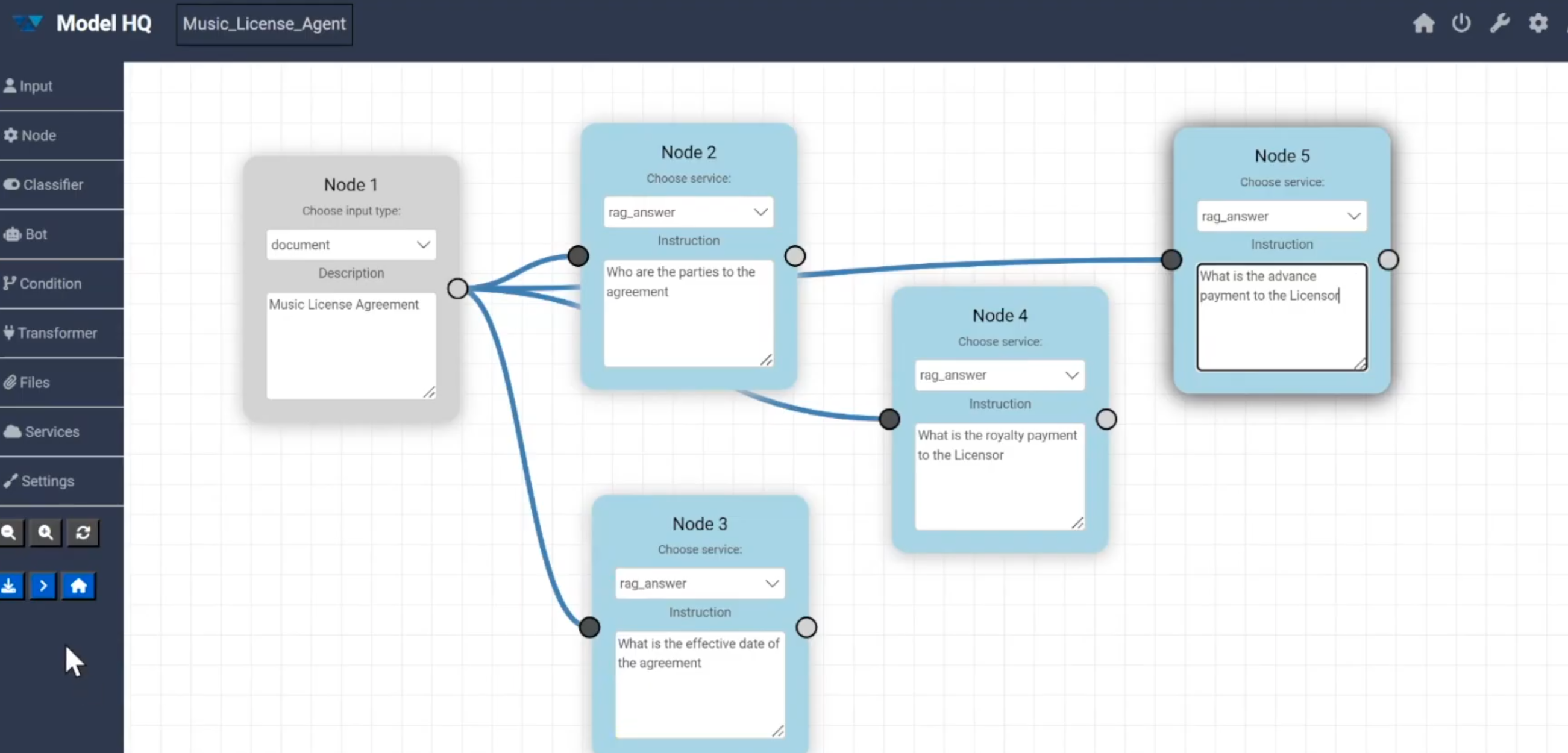
The complete no-code set-up for this agent (this example shows 5 nodes — but you can have as few as 2 if you only ask one question):
Who This Is For
This is useful for:
- Legal and compliance teams reviewing contracts (NDAs, licenses, vendor agreements)
- Business teams (HR, Operations, Procurement, Finance)
- Analysts doing repetitive document review
- Developers prototyping document workflows with RAG
- Anyone who needs to extract the same information from many similar documents
What You'll Learn
- How to build a contract analyzer using the Visual Builder
- How to connect a document input to multiple RAG answer steps
- How re-ranking improves accuracy on long documents
- How to test the agent on a single document
- How to run it on many documents at once (Batch Mode)
- How to export results for reporting or automation
Ingredients (What You Need)
- Model HQ installed on your device.
- A local model that supports chat / RAG (we use Llama 3.2 3B by default). It downloads automatically the first time you run the agent.
- A few sample music license agreements (already included with Model HQ), located at:
C:\Users\<username>\llmware_data\sample_files\AgreementsLarge\. Good ones to try: Cybele Music License Agreement.pdf, Diana Music License Agreement.pdf, Circe License Agreement for Copyrighted Music.pdf. - No coding required.
Watch the Demo
Want to follow along on video? Here's the full walkthrough on the Model HQ YouTube channel — "Contract Analyzer Agent in Minutes (No-Code + Offline) | Model HQ Demo". Useful timestamps are called out in each step below.
Quick Steps (Build It in 5 Minutes)
If you just want to copy what's in the screenshot, follow this short version. The detailed walkthrough is right after — read it whenever you want the why.
- Open Agents → Build New → Visual Builder, click
>. - Name the agent:
Music_License_Agent. - Drag an Input node onto the canvas → set Choose input type to
document. - Drag a Node, set service to
rag_answer, instruction:Who are the parties to the agreement?. Wire it back to the Input node. - Repeat step 4 three more times with these questions:
What is the effective date of the agreement?What is the royalty payment to the licensor?What is the advance payment to the licensor?
- (Optional) Add one more node with service
agent_reportto get a polished Word/JSON summary. - Click Save Agent, then Run, and upload one of the sample PDFs from
AgreementsLarge\. - Once it works, go back and click Batch Run to process several contracts at once.
That's the whole agent. The rest of this cookbook explains each step in plain English.
Why Model HQ Builds Agents Differently
Most agent builders run against a big cloud model. Model HQ takes a different approach:
- Each task is broken into its own small node.
- Small, specialized models are stacked together — one to parse, one to rank, one to answer.
- The whole workflow runs on your device.
The result: accurate, repeatable answers, without sending your contracts anywhere.
Step-by-Step Walkthrough
1. Open the Agents Interface
Goal: get to the agent builder. (Min Time Required: ~3:45)
- From the Home Screen, click Agents in the left sidebar.
- In the Agent Menu, choose Build New.
- Click
>to continue. - On the Build New Agent screen, pick Visual Builder.
The Visual Builder canvas opens. This is the drag-and-drop space where the agent gets put together.
2. Name the Agent
At the top of the canvas, give the agent a name. We'll call ours:
Music_License_AgentA clear name makes it easy to find later under Load Existing, and easy to recognize when you share it with a teammate.
3. Add the Input Node (Document)
Goal: tell the agent what kind of input it should expect. (Min Time Required: ~4:19)
- On the left sidebar, click and drag the Input option onto the canvas.
- Open the node and set:
- Choose input type:
document - Description:
Music license agreement (PDF, DOCX, PPTX, TXT, or MD).
- Choose input type:
Now Model HQ knows that, when this agent runs, it should ask the user to upload a document. That document becomes the source for every question we ask next.
4. Add the First RAG Answer Node — Parties
Goal: ask the first question — and tell the agent to answer it from the uploaded document.
- Drag a Node from the left sidebar onto the canvas.
- In the node's Choose service dropdown, pick
rag_answer. - In the Instruction field (this is where you "prompt" the model), type:
Who are the parties to the agreement? - Wire the Input node → this RAG answer node by dragging a line between their connection dots.
A quick tip on prompting: keep the instruction short, plain, and direct — like you're asking a colleague. "Who are the parties to the agreement?" works far better than a long, formal prompt.
5. Add Three More RAG Answer Nodes
Repeat step 4 for each question. For our Music License Analyzer we add three more rag_answer nodes — each wired back to the Input node:
| # | Service | Instruction (the prompt) |
|---|---|---|
| 2 | rag_answer | What is the effective date of the agreement? |
| 3 | rag_answer | What is the royalty payment to the licensor? |
| 4 | rag_answer | What is the advance payment to the licensor? |
Your canvas should now look like a fan: one Input node feeding four parallel RAG answer nodes.
6. Confirm the Model and Services
Click any node to check:
- Model —
Llama 3.2 3B(the default chat / RAG model). A check mark next to a model name means it's already on your device. A download icon means it'll be downloaded the first time the agent runs. - Services — make sure
rag_answerandparse_documentare turned on in the Services catalog (left sidebar → Services).
7. Save and Run on One Contract
- Click Save Agent (left sidebar).
- Click Run.
- When prompted, upload a sample agreement, e.g.
C:\Users\<username>\llmware_data\sample_files\AgreementsLarge\Cybele Music License Agreement.pdf. - Click
>to start.
Model HQ will parse the document, run each rag_answer step, and show the results in a Summary Report Table.
Example Output (Cybele Music License Agreement)
| Step | Question | Answer |
|---|---|---|
rag_answer_1 | Who are the parties to the agreement? | The parties are Cybele and Lotus Music Company. |
rag_answer_2 | What is the effective date? | February 1, 2020. |
rag_answer_3 | What is the royalty payment? | (royalty schedule extracted from the contract) |
rag_answer_4 | What is the advance payment? | (advance amount extracted from the contract) |
You also get:
- An Inference History table — tokens used, first-token latency, and total time per step.
- A Files Created section — generated reports and artifacts.
8. (Optional) Add an Agent Report Step
Want a polished output? Add a final reporting node:
- Drag a new Node onto the canvas after the last RAG answer.
- Set its service to
agent_report. - Use a clear instruction, e.g.
Music License Agreement — Summary of Key Terms. - Wire the previous nodes' outputs into it (use a Transformer node set to
Agent-Stateif you need to pass everything along).
agent_report produces a Word document, a JSON file, and a Markdown summary — automatically pulling in each rag_answer result.
9. Run It in Batch Mode (Many Contracts at Once)
Once it works on one contract, scale it up.
- Go to Agents → Load Existing and pick Music_License_Agent.
- Click
>. - Choose Batch Run (instead of Run (Details) or Run (Demo)).
- In Upload Documents for Batch Processing, select several files, e.g.:
- Circe License Agreement for Copyrighted Music.pdf
- Cybele Music License Agreement.pdf
- Diana Music License Agreement.pdf
- Eos License Agreement for Copyrighted Music.pdf
- Click
>to start.
Model HQ runs the full agent on each file independently and bundles the results.
Batch Outputs
When the batch is done, you can download:
| File | What it is |
|---|---|
<agent_name>_batch_results.json | Per-document, per-question answers in JSON. Great for dashboards and APIs. |
<agent_name>_batch_report.docx | One Word doc with all answers and a per-document summary. |
| Per-document artifacts | Each contract also produces its own report, mermaid chart, and take-aways file. |
These plug nicely into BI tools, ticketing systems, CLM platforms, or audit trails.
10. (Optional) Share or Deploy the Agent
Once it works, share it without rebuilding:
- Share by ZIP — Agents → Load Existing → Music_License_Agent → Share. The ZIP contains only configuration and documents (no executable code), so it's safe to email.
- Upload on another machine — On your colleague's Model HQ install: Agents → Build New → Upload (or the Upload button next to Load Existing) and pick the ZIP. The agent shows up in their Load Existing list right away.
- Run via the Model HQ API Server — Expose the agent over a local HTTP endpoint so other apps can use it.
- Add a Demo mode — Before sharing, set up a demo so colleagues can run the agent end-to-end with one click and immediately see what it does.
Anatomy of the Final Agent
[ Input: document ]
        │
        ├──▶ [ rag_answer: Who are the parties? ]
        │
        ├──▶ [ rag_answer: Effective date? ]
        │
        ├──▶ [ rag_answer: Royalty payment? ]
        │
        ├──▶ [ rag_answer: Advance payment? ]
        │
└──▶ [ agent_report: Summary of Key Terms ] (optional)- One input — the contract.
- Several parallel RAG answers — each one looks at the contract on its own.
- One optional report — for a polished, shareable summary.
Summary Table
| Step | Action | Outcome |
|---|---|---|
| 1 | Open Agents → Build New → Visual Builder | New blank canvas |
| 2 | Name the agent (Music_License_Agent) | Easy to find later |
| 3 | Add Input node (document) | Defines runtime upload |
| 4–5 | Add rag_answer nodes wired to Input | Each question answered from the contract |
| 6 | Confirm model & services | Llama 3.2 3B, rag_answer, parse_document |
| 7 | Save & Run on one contract | Validate the answers |
| 8 | (Opt.) Add agent_report | Polished Word / JSON output |
| 9 | Batch Run across many contracts | Scaled, repeatable execution |
| 10 | Share / Deploy | Send to colleagues or call from an app |
Reach out to our team at support@aibloks.com